Your first query
Once at least one connector is syncing, Nimbus can answer questions against your local index. This page shows the two surfaces — the Tauri desktop app and the CLI — and explains what happens under the hood when you ask a question.
Two surfaces, same Gateway
Section titled “Two surfaces, same Gateway”The Tauri desktop app (Quick Query popup and full Chat panel) and the
CLI (nimbus ask, nimbus query) are both thin clients. They communicate
with the Gateway over JSON-RPC 2.0 IPC — a domain socket on macOS / Linux, a
named pipe on Windows. The Gateway holds the index, runs the agent, and streams
results back. Both surfaces produce the same answer from the same audit trail.
Quick Query (desktop — not released yet)
Section titled “Quick Query (desktop — not released yet)”Desktop app only; the desktop app has not been released yet. Use nimbus ask (below) today.
Quick Query is the fastest way to ask a one-off question without switching away from your current application.
-
Press the global hotkey from anywhere:
Platform Hotkey macOS Cmd + Shift + NWindows / Linux Ctrl + Shift + N -
The frameless Quick Query window appears centred on your primary display. Type your question and press Enter.
-
Tokens stream into the response area as they arrive from the LLM.
-
The window auto-closes approximately 2 seconds after the stream finishes.
-
Press Esc at any time to close immediately and discard the response.
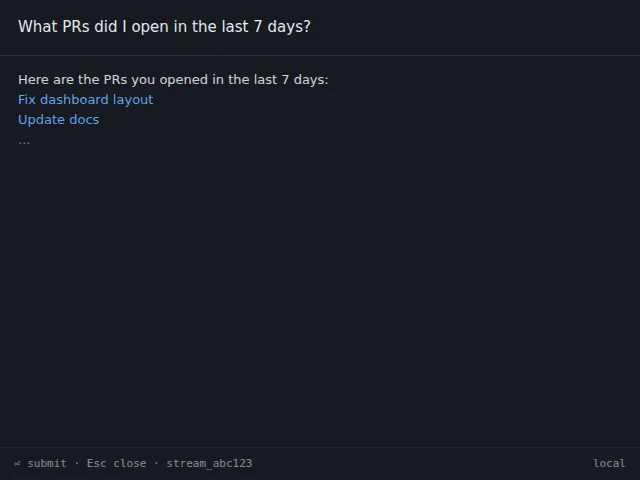
The Quick Query popup is intentionally minimal — no history, no follow-up prompts. For a multi-turn conversation, open the full Chat panel from the sidebar.
nimbus ask (CLI)
Section titled “nimbus ask (CLI)”The CLI surface is useful for scripting, piping output into other tools, or when you prefer the terminal.
nimbus ask "What PRs did I open in the last 7 days?"Tokens stream to stdout as they arrive. The response ends with a trailing newline when the stream is complete.
Pipe the output:
nimbus ask "Summarise my open Linear issues as a bullet list" | pbcopyCancel mid-stream:
Press Ctrl+C. The Gateway receives the cancel signal and stops dispatching
new chunks. Any pending tool calls in the current agent step are aborted. The
Gateway process itself continues running.
What just happened
Section titled “What just happened”When you send a question, the Gateway runs the following pipeline:
- Intent classification. The LLM router classifies the question to decide which data sources and tools are relevant.
- Semantic search. The Gateway queries the local SQLite index (metadata + embeddings) to find items that match the question context.
- Optional connector tool calls. For questions that require live data beyond what is indexed (e.g., fetching a specific file body, resolving a PR diff), the agent dispatches read-only MCP tool calls to the relevant connector processes. Write tools are never called without a HITL consent prompt.
- LLM synthesis. The ranked context and tool results are passed to the LLM (local via Ollama / llama.cpp, or remote if configured). The LLM generates a response token by token.
- Streaming. Tokens arrive over the
engine.askStreamIPC notification channel and are forwarded to the client surface.
For a full description of the agent pipeline, see the Architecture overview.
Index-only queries — nimbus query
Section titled “Index-only queries — nimbus query”For structured queries that do not need the LLM, use nimbus query. It reads
directly from the local index — faster, deterministic, and scriptable.
Query by service and type:
# All PRs from the last 7 daysnimbus query --service github --type pr --since 7d --json
# Pinned items, formatted as cardsnimbus query --service linear --type issue --json
Raw SQL (read-only guard):
nimbus query --sql "SELECT title FROM items WHERE pinned = 1" --prettyThe --sql flag passes the statement through a read-only guard: only SELECT
statements are accepted. INSERT, UPDATE, DELETE, DROP, and DDL
statements are rejected at the parser before reaching the database.
Output modes:
| Flag | Output |
|---|---|
| (none, TTY) | Human-readable card format |
| (none, piped) | Compact JSON, one object per line — jq-friendly |
--json |
Pretty-printed JSON (2-space indent) |
--pretty |
Force card format even when piped |
Streaming details
Section titled “Streaming details”All nimbus ask responses stream token-by-token over the IPC notification
channel (engine.askStream). The Tauri Chat panel (in the unreleased desktop app) renders
Markdown incrementally as tokens arrive. The CLI writes each chunk to stdout as a UTF-8
string fragment without buffering.
If the stream stalls for more than 15 seconds with no new tokens (network
latency or a slow local model), the CLI prints a [stalled] marker and waits.
The stream resumes automatically when the model produces the next token.
Cancel semantics
Section titled “Cancel semantics”| Surface | How to cancel |
|---|---|
| CLI | Ctrl + C |
| Chat panel (desktop, not released yet) | Stop button |
| Quick Query (desktop, not released yet) | Esc (closes the window and cancels) |
Cancelling sends a cancel signal to the Gateway’s agent executor. The LLM may complete the current in-flight chunk before stopping — no partial chunks are discarded mid-token. Any pending read tool calls are aborted. Gated write actions that have not yet received a HITL approval are dropped.