HITL & safety
HITL (Human-In-The-Loop) is the mechanism that requires your explicit approval before Nimbus takes any action that changes state outside your local machine. This page explains what is gated, what is not, and why the gate is architectural rather than configurable.
Why HITL
Section titled “Why HITL”Nimbus is an AI agent that can act on your behalf — sending messages, creating issues, pushing to source control, calling cloud APIs. Without a structural consent gate, a prompt-injection attack or a confused-model step could send an email you didn’t write, close an issue you didn’t intend to close, or invoke a Terraform apply against your production environment.
The gate is in the executor (packages/gateway/src/engine/executor.ts), not in
the LLM prompt. A carefully worded prompt cannot disable it. A connector cannot
opt out. An extension cannot override it. Configuration files have no flag that
removes it. The gate fires unconditionally for every action type in the frozen
whitelist, regardless of how the action arrived at the executor.
What’s gated — the frozen set
Section titled “What’s gated — the frozen set”The gated action types are defined as a ReadonlySet frozen with
Object.freeze at module load time. The set is module-private — no runtime
code can add to it or remove from it after the process starts.
The action types fall into the following categories. Every action in these categories always triggers a consent prompt, with no exceptions:
File writes, moves, and deletes
Section titled “File writes, moves, and deletes”Any operation that creates, overwrites, moves, renames, or deletes a file on an indexed service (Google Drive, OneDrive) or on the local filesystem (if filesystem indexing is enabled).
Message sends
Section titled “Message sends”Posting a message to a Slack channel or DM, sending a Teams message or chat, sending or creating an email draft. Creating a draft is gated — not just sending it — because drafts stored in your mail account represent an action outside Nimbus.
Issue, PR, and ticket lifecycle
Section titled “Issue, PR, and ticket lifecycle”Creating, updating, or commenting on issues, pull requests, and tickets across GitHub, GitLab, Bitbucket, Linear, Jira, Notion databases, and Confluence pages. This includes opening a PR, closing an issue, merging a branch, or pushing a commit.
CI/CD triggers
Section titled “CI/CD triggers”Running, cancelling, or retrying a pipeline on GitHub Actions, GitLab CI, CircleCI, or Jenkins. A CI trigger is gated even when it is a re-run of a previously passing build — the agent cannot trigger pipelines autonomously.
Cloud infrastructure changes
Section titled “Cloud infrastructure changes”Any write or destructive call against AWS (ECS, Lambda, EC2), Azure (App Service, AKS), GCP (Cloud Run, GKE), Kubernetes (deployments, pods, rollouts), or IaC tools (Terraform apply/destroy, CloudFormation deploy, Pulumi up). Monitoring actions that change incident state — acknowledging, silencing, or resolving a PagerDuty incident or alert — are also gated.
Vault changes
Section titled “Vault changes”Writing or deleting a secret via the vault.set or vault.delete IPC methods.
Internal vault operations performed by the Gateway on your behalf (such as
storing a new connector’s OAuth token after an authorisation flow) bypass the
IPC gate by design and are audited separately.
Connector and data operations
Section titled “Connector and data operations”Removing a connector, installing an extension, re-indexing a connector, and exporting or deleting service data from the local index.
Third-party tools: user MCP servers and extensions
Section titled “Third-party tools: user MCP servers and extensions”Installing an extension does not run it. Running one needs a separate approval
(nimbus extension approve <id>, the extension.run action type), and every
call to one of its tools, like every call to a tool on an MCP server you
registered yourself with nimbus connector add --mcp, asks for your approval
again. There is no standing approval for those calls, and a delegate can never
approve one. If you approved an extension or a server with --model, the
assistant may propose calls to its tools, and each one still raises the prompt.
Adding a new action type to the set
Section titled “Adding a new action type to the set”The frozen set is a source-code constant in
packages/gateway/src/engine/executor.ts. To add a new action type, a
developer must edit the file, pass code review (which checks the corresponding
security invariant test in
packages/gateway/src/security-invariants.test.ts), and ship a release.
There is no runtime API for expanding the set.
What’s not gated
Section titled “What’s not gated”Read-only operations are never gated. The agent freely uses these without asking:
- Searching or listing items in the local index
- Fetching file metadata (name, path, size, modified time)
- Reading document text that has already been indexed
- Querying connector APIs for lists, diffs, or issue details (read-only MCP tool calls)
- Listing people, threads, channels, or repositories
- Running
nimbus queryornimbus askquestions
The principle: only actions that change state outside Nimbus require consent. Reading data — even from a cloud API — does not.
The consent prompt
Section titled “The consent prompt”When a gated action is reached, the executor pauses and surfaces a consent prompt. The prompt shows a structured preview of the action: the action type, the target resource, and the full payload — not a LLM-generated summary but the actual parameters that will be sent to the connector.
Tauri desktop app (not released yet)
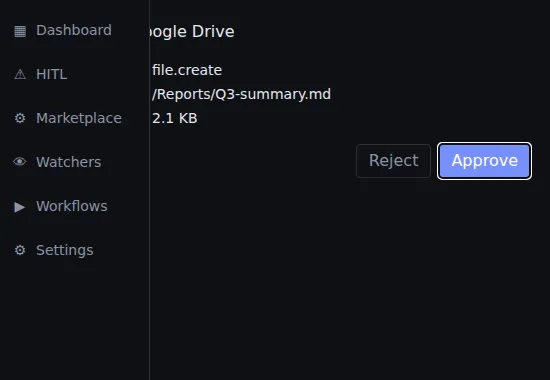
Section titled “Tauri desktop app (not released yet)”The desktop app has not been released, so today the consent prompt reaches you in the CLI or the VS Code extension (below). In the desktop app as built, a dedicated HITL popup window appears above all other windows. It shows the action type, a structured diff-style preview of the payload, and two buttons: Approve and Reject. The agent waits until you respond; no timeout.
An inline prompt interrupts the streaming output:
[HITL] file.create on Google Drive  path: /Reports/Q3-summary.md  size: 2.1 KB
[a]pprove  [r]eject  [d]etails  [q]uit
Press a to approve, r to reject, d to see the full JSON payload, or q
to quit the current agent session (all remaining gated actions are rejected).
VS Code extension
Section titled “VS Code extension”An inline consent card appears in the chat panel when it is focused. If the panel is not in the foreground, a VS Code information-message toast notifies you that consent is waiting — click it to bring the panel into focus and review the action.
Multi-action batches
Section titled “Multi-action batches”When the agent plans multiple gated actions in a single session, the consent prompt shows the full batch up front so you can review the scope of what is about to happen. You can approve all, reject all, or approve some and reject others.
Partial approval: if you reject one action in a batch, any subsequent
actions that depend on the rejected step are automatically marked skipped —
not failed. The agent does not retry rejected actions. It continues executing
the approved steps and reports what was skipped in the final response.
Audit log
Section titled “Audit log”Every gated action — approved or rejected — is recorded to the local audit log before execution begins. The log is append-only. Each row is BLAKE3-hashed with the previous row’s hash as input, so the chain is tamper-detectable: if any historical row is modified or deleted, subsequent hashes will not verify.
Verify the chain:
nimbus audit verifynimbus audit verify --full # checks every row, not just the tailExport for compliance or incident review:
nimbus audit export --output /tmp/nimbus-audit.jsonThe export is a JSON array of audit records with timestamps, action types, payload hashes, consent decisions, and the hash chain values.