Connect your first service
Nimbus indexes your data locally — but first it needs permission to read from your cloud services. This page walks through adding your first connector, using Google Drive as the worked example.
Pick a service
Section titled “Pick a service”For a first connector, Google Drive or GitHub are the easiest starting points. Both have straightforward OAuth flows and produce visible index activity within seconds of authorisation.
Nimbus supports the following services:
| Category | Services |
|---|---|
| File storage | Google Drive, OneDrive, filesystem (opt-in roots) |
| Email & calendar | Gmail, Outlook |
| Messaging | Slack, Microsoft Teams |
| Photos | Google Photos |
| Source control | GitHub, GitLab, Bitbucket |
| Project tracking | Linear, Jira, Notion, Confluence |
| CI/CD | GitHub Actions, GitLab CI, CircleCI, Jenkins |
| Incident management | PagerDuty |
| Observability | Sentry, Grafana, Datadog, New Relic |
| Infrastructure | Kubernetes, AWS, Azure, GCP, IaC tools (Terraform, Pulumi, CloudFormation) |
For per-service setup details, scopes, and known limitations, see the Connectors reference.
Worked example: Google Drive
Section titled “Worked example: Google Drive”1. Open the Connectors panel
Section titled “1. Open the Connectors panel”In the Nimbus desktop app, click Settings in the sidebar (or press S),
then select Connectors.
2. Add the connector
Section titled “2. Add the connector”Click the Google Drive tile. If no connector is configured yet, you can also reach this from the onboarding wizard on first launch.
3. Authenticate
Section titled “3. Authenticate”Click Authenticate. Nimbus opens your system browser to Google’s OAuth consent screen. The scopes requested are read-only by default:
| Scope | Purpose |
|---|---|
drive.readonly |
List files and folders; read metadata |
drive.file (exported text types only) |
Read document text for indexable formats |
Write and delete scopes are never requested unless you explicitly enable a write tool that triggers a HITL-gated action. Nimbus requests the minimum scope set required for the tools you have actually enabled.
4. Approve and return
Section titled “4. Approve and return”Approve the scopes on the Google consent screen. Your browser will show:
“You may close this window.”
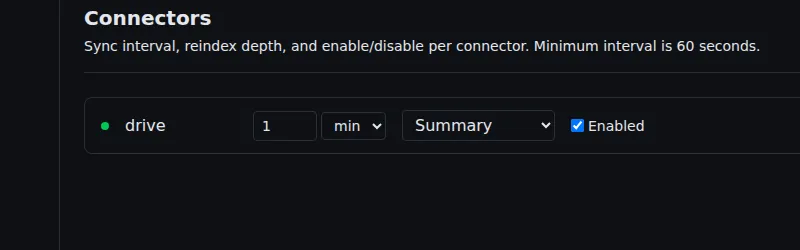
Switch back to Nimbus. The Google Drive connector row now shows a green health dot and the status Enabled.
What gets indexed
Section titled “What gets indexed”Once connected, the initial sync starts immediately. The following metadata is indexed for every file:
- File path and name
- MIME type
- Last-modified timestamp
- File size
- Owner display name
Text content is also indexed for indexable types: Markdown, plain text, Google Docs (exported as plain text), Google Sheets (cell values), and Google Slides (speaker notes + slide text). This is what enables semantic search — “find the Q3 planning doc” resolves to the right file even if you don’t remember its exact name.
For Google Photos, only metadata is indexed: album name, capture timestamp, and location (if you opt in to location data in the connector settings).
What does NOT get indexed
Section titled “What does NOT get indexed”| Not indexed | Reason |
|---|---|
| File permissions and sharing settings | Out of scope for the connector surface — Nimbus indexes content and metadata, not access-control lists |
| Binary file content (images, PDFs, compiled artefacts) | Not text-extractable without a conversion step |
| Trashed / deleted files | Not surfaced by the Drive API delta feed |
| Files in shared drives you do not have read access to | Access is validated at OAuth time |
Sync schedule
Section titled “Sync schedule”| Sync type | When |
|---|---|
| Initial sync | Runs immediately after a successful OAuth handshake |
| Incremental sync | Every 60 seconds by default |
| Delta sync | Drive, Gmail, and OneDrive use the API’s native change token — only changed items are fetched |
You can adjust the per-connector sync interval with
nimbus connector set-interval <service> <duration> (for example
nimbus connector set-interval google_drive 5m). The desktop app’s
Settings → Connectors → (connector name) → Sync interval does the same once
the desktop app is released.
Authorising more services
Section titled “Authorising more services”Repeat the same flow for each additional service. Multiple connectors sync in
parallel; nimbus connector list shows each connector’s item count and
last-synced time. There is no limit to the number of connectors you can configure.
Disconnecting or removing a connector
Section titled “Disconnecting or removing a connector”To remove a connector, run nimbus connector remove <service> (the desktop
app’s Settings → Connectors → (connector name) → Remove does the same once
the desktop app is released):
nimbus connector remove google_drive- Nimbus asks you to confirm before deleting the stored OAuth credential (from the system vault) and all indexed items from that service.
- Because this is a destructive operation, removal is HITL-gated in the Gateway; the CLI’s confirmation is the answer to that consent request, so you are asked once. Decline and nothing is sent.
The removal cascade deletes the vault credential first, then the indexed items. If you reconnect the same service later, a fresh initial sync re-populates the index.